How the hell do you typeset?
I am a programmer and educator by trade. Ironic for owning a publishing company, I know. But I did find a solution, and it was unique to me. LaTeX! But let me give you some background so the payoff is worth it.
I finished my first novel, Seven Minutes, and then looked at the document and thought, “this is a complete mess.” I spent days wrestling with Word. Then I switched over to Google Docs and struggled there to get my book to look even presentable. I was lost. What is a gutter? How do I space lines to not look like the words are all just a single block of black ink on the page? Who programmed these tools?
Frustrated, defeated, and all around dejected, I resigned myself that my story was good but in a format that would never reflect that. I searched online for what to do. A lot of sources online suggested I hire a professional typesetter or pay the equivalent of my college loans to rent the software to do it. As an indie publisher without a book to be sold, and thus no income, none of these options were viable.
I didn’t even know the term typesetting until very late. Even after founding the publishing company I didn’t know what it meant. It is taking the words that you wrote and setting them on the page intentionally. It is making each page flow and have natural breaking points. Chapters end and the next one starts on a new page. Even small details like header and footer formatting (something that no one thinks about and often doesn’t even look at until it is midnight and they need to know what page they are on).
Typesetting is one of those things that nobody notices until it is bad. It is invisible if it is decent or good. But a glaring issue if it is a notch down from that. Your story could be the next number one book, outselling the Bible, but without correct formatting you are left with a story in a book that can’t be read (or at least refuses to be read). And even at its best, poor typesetting can quietly make a book feel cheap.
Tools like Word and Google Docs were mostly made with business suites in mind. You need to create a boring report on the reasons the sun sets? Perfect, you can do that and add a table to it as well. Book setting? Not so much. It is possible and is an option, but it wasn’t the original purpose.
Vellum and InDesign (the aforementioned software) are programs made for typesetting. They have a bit of a learning curve and a lot of important features are behind a paywall. Hiring a typesetter on Fiverr will most likely use these tools or something similar.
So, no money, a story that was good but looked horrible, I was lost.
Then I remembered something! LaTeX. I used it in college to do my math homework (and arguably that is what it is intended for (the math part, not necessarily homework)). LaTeX is a pseudo programming language, but don’t let that scare you or force you to stop reading.
(Hey, me here from the end of the article. Don’t worry, I am providing a solution and a downloadable project for you to use and play with. It is at the end. Okay, keep going.)
LaTeX allows you to write your own custom commands—small instructions you define once and can reuse to format things exactly how you want them. A drop cap to open a chapter, a unique look for a specific voice, a header that works for you and not against you—you name it once, and it stays that way. AND it allows you to keep things consistent across your series. Like what you did in the first book and want to do the same thing in the second without wrestling a new Word doc? Just copy over the custom commands and use them.
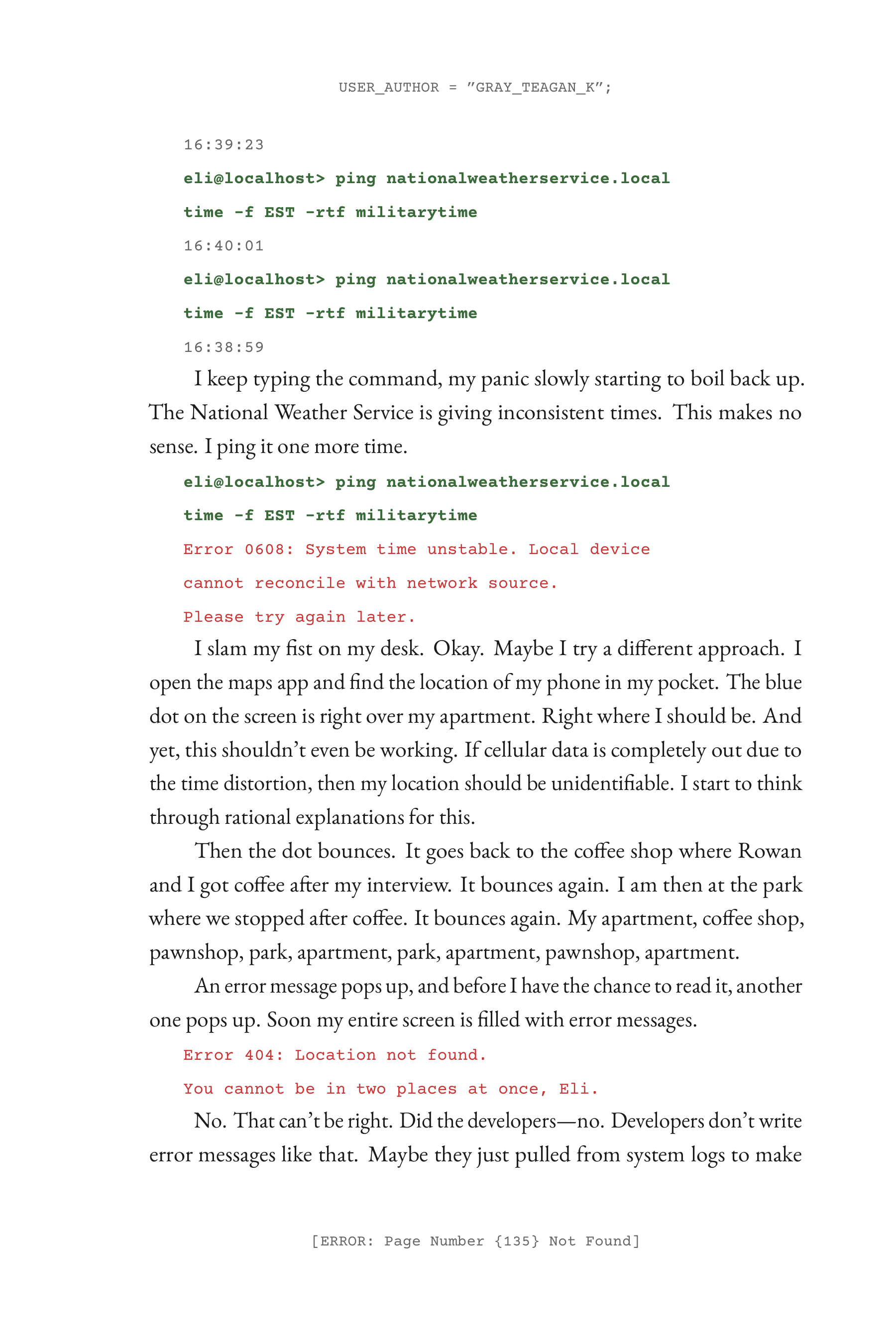
Here is an example of a PDF page from my book Seven Minutes. I will paste the LaTeX commands under here to show you what that looks like. Before you click away, though, I want to show you something after the code.
Kind of spoiler warning. Not really, but it does have text from Seven Minutes.
% preamble.tex
% ── Define once ──────────────────────────────────────────────

\definecolor{sysgreen}{HTML}{3A6A3A}   % System voice — muted forest green
\definecolor{dimgray}{HTML}{666666}    % Metadata, timestamps
\definecolor{corrupt}{HTML}{CC3333}    % Corruption/glitch red

\newcommand{\cmdline}[1]{%
    \par\noindent\hspace{1.5em}%
    {\small\ttfamily\bfseries\color{sysgreen}#1}%
}
\newcommand{\stamp}[1]{%
    \par\noindent\hspace{1.5em}%
    {\small\ttfamily\color{dimgray}#1}%
}
\newcommand{\syserror}[1]{%
    \par\noindent\hspace{1.5em}%
    {\small\ttfamily\color{corrupt}#1}%
}


% RL0010-eli-sep26-359pm.tex
% ── Then the prose stays clean ───────────────────────────────

\cmdline{eli@localhost> ping nationalweatherservice.local}
\cmdline{time -f EST -rtf militarytime}

\stamp{16:38:59}

I keep typing the command, my panic slowly starting to boil back
up. The National Weather Service is giving inconsistent times.
This makes no sense. I ping it one more time.

\cmdline{eli@localhost> ping nationalweatherservice.local}
\cmdline{time -f EST -rtf militarytime}

\syserror{Error 0608: System time unstable. Local device}
\syserror{cannot reconcile with network source.}
\syserror{Please try again later.}

I slam my fist on my desk. Okay. Maybe I try a different approach.
I open the maps app and find the location of my phone in my pocket.

\syserror{Error 404: Location not found.}
\syserror{You cannot be in two places at once, Eli.}
Now, notice something, the preamble.tex is… confusing and difficult. That is the hard part. But the prose? It is just the commands I defined in the preamble. So, once the command is defined, prose becomes simple and clean.
That is why I now write my books directly into LaTeX. Define the commands I think I want (and go back to add some when something new comes up), and then… just write.
There is a drawback though. It isn’t just a pull it out of the box and start using it. There are a lot of guides online about LaTeX that will get you started, but the same downside of tools like InDesign applies here. Learning. The thing about LaTeX is that it is free. You still might find yourself wrestling with formatting at some points, staying up until 3 AM trying to figure out why a single ‘i’ had tipped onto its side. It happens, and it happened to me. But once I got it, I was able to use it for the next book, and the book after that, and… You get it.
At TKG Publishing we believe in telling stories. Some of those stories extend outside of the words on the page and into how the words play with each other on the page. The formatting of the story can say something as loud as the words themselves. I wanted to be able to typeset my books in a way that allowed that story to be told, and the words to be an extension of that format. LaTeX lets me do that, and more.
The sad part of it? No one will notice it. That is the point, though. You don’t want people to notice it. It hopefully is a subconscious signal to the reader. 11:45 AM and 11:52 AM in Seven Minutes are expressly formatted in a separate font from other times. Easy to miss, exactly how I want it. When someone passes those times, I want them to feel something, and not even know why.
So, if you are looking to format your book how you want it formatted, then think about using LaTeX. As promised earlier, there is a zip file with a starter LaTeX project for you to download and play with. Feel free to mess around, play with it, break things. That is all the point. We are writers and publishers. Part of writing is exploring places people don’t normally go. This time, instead of a world that no one has explored, it is a .tex file.
And if you want to see it in action, you can buy Seven Minutes. Look for those tiny details that most readers will miss (should miss). When you catch one, have that ‘ah-ha’ moment. If you feel like it, message me. I would love to talk about it.
Bottom line: find solutions that work for you.